Figure.1
| PolarSPARC |
Hands-on LangChain4J
| Bhaskar S | 01/01/2026 |
Overview
LangChain4J is an open-source Java framework designed to simplify the integration of the Large Language models (or LLMs for short) as well as Embedding Vector Stores into Java applications by abstracting away the complexities of working with the different providers and exposing standardized interfaces for building and deploying AI applications in Java.
The following are the list of some of the important features of LangChain4J:
Integration with various LLM Providers
Integration with various Embedding Vector Stores
Support for Prompt Templates
Support for Chat Memory
Support for Function Calling via Tools
Support for Retrieval Augmented Generation (RAG for short)
The intent of this article is NOT to be exhaustive, but a primer to get started quickly.
Installation and Setup
The installation and setup will be on a Ubuntu 24.04 LTS based Linux desktop. Ensure that Ollama is installed and setup on the desktop (see instructions).
Further, ensure at least Java 21 or above is installed and setup. In addition, ensure Apache Maven is installed and setup.
We will use LangChain4J along with Spring Boot for all the hands-on demonstrations in this article.
Assuming that the ip address on the Linux desktop is 192.168.1.25, start the Ollama platform by executing the following command in the terminal window:
$ docker run --rm --name ollama -p 192.168.1.25:11434:11434 -v $HOME/.ollama:/root/.ollama ollama/ollama:0.13.5
If the linux desktop has Nvidia GPU with decent amount of VRAM (at least 16 GB) and has been enabled for use with docker (see instructions), then execute the following command instead to start Ollama:
$ docker run --rm --name ollama --gpus=all -p 192.168.1.25:11434:11434 -v $HOME/.ollama:/root/.ollama ollama/ollama:0.13.5
For the LLM models, we will be using the Microsoft Phi-4 Mini for the chat interactions and the IBM Granite 4 Micro model for the tools execution.
Open a new terminal window and execute the following docker command to download the IBM Granite 4 Micro model:
$ docker exec -it ollama ollama run granite4:micro
After the model download, to exit the user input, execute the following user prompt:
>>> /bye
Next, in the opened terminal window and execute the following docker command to download the Microsoft Phi-4 Mini model:
$ docker exec -it ollama ollama run phi4-mini
After the model download, to exit the user input, execute the following user prompt:
>>> /bye
Let us assume the root directory for this project is $HOME/java/LangChain4J.
The following is the listing for the Maven project file pom.xml:
<?xml version="1.0" encoding="UTF-8"?>
<project xmlns="http://maven.apache.org/POM/4.0.0" xmlns:xsi="http://www.w3.org/2001/XMLSchema-instance"
         xsi:schemaLocation="http://maven.apache.org/POM/4.0.0 https://maven.apache.org/xsd/maven-4.0.0.xsd">
    <modelVersion>4.0.0</modelVersion>

    <name>LangChain4J</name>
    <description>LangChain4J</description>
    <groupId>com.polarsparc</groupId>
    <artifactId>LangChain4J</artifactId>
    <version>1.0</version>

    <parent>
        <groupId>org.springframework.boot</groupId>
        <artifactId>spring-boot-starter-parent</artifactId>
        <version>3.5.9</version>
        <relativePath/> <!-- lookup parent from repository -->
    </parent>

    <properties>
        <java.version>21</java.version>
        <langchain4j.version>1.10.0</langchain4j.version>
        <langchain4j.other.version>1.10.0-beta18</langchain4j.other.version>
        <jackson.version>2.20.1</jackson.version>
    </properties>

    <dependencies>
        <dependency>
            <groupId>org.springframework.boot</groupId>
            <artifactId>spring-boot-starter</artifactId>
        </dependency>
        <dependency>
            <groupId>org.springframework.boot</groupId>
            <artifactId>spring-boot-starter-web</artifactId>
        </dependency>
        <dependency>
            <groupId>org.springframework.boot</groupId>
            <artifactId>spring-boot-starter-test</artifactId>
            <scope>test</scope>
        </dependency>
        <dependency>
            <groupId>dev.langchain4j</groupId>
            <artifactId>langchain4j</artifactId>
            <version>${langchain4j.version}</version>
        </dependency>
        <dependency>
            <groupId>dev.langchain4j</groupId>
            <artifactId>langchain4j-core</artifactId>
            <version>${langchain4j.version}</version>
        </dependency>
        <dependency>
            <groupId>dev.langchain4j</groupId>
            <artifactId>langchain4j-ollama</artifactId>
            <version>${langchain4j.version}</version>
        </dependency>
        <dependency>
            <groupId>dev.langchain4j</groupId>
            <artifactId>langchain4j-chroma</artifactId>
            <version>${langchain4j.other.version}</version>
        </dependency>
        <dependency>
            <groupId>dev.langchain4j</groupId>
            <artifactId>langchain4j-embeddings</artifactId>
            <version>${langchain4j.other.version}</version>
        </dependency>
        <dependency>
            <groupId>dev.langchain4j</groupId>
            <artifactId>langchain4j-spring-boot-starter</artifactId>
            <version>${langchain4j.other.version}</version>
        </dependency>
        <dependency>
            <groupId>com.fasterxml.jackson.core</groupId>
            <artifactId>jackson-databind</artifactId>
            <version>${jackson.version}</version>
        </dependency>
    </dependencies>

    <build>
        <plugins>
            <plugin>
                <groupId>org.springframework.boot</groupId>
                <artifactId>spring-boot-maven-plugin</artifactId>
            </plugin>
        </plugins>
    </build>
</project>
The following is the listing for the logger properties file simplelogger.properties:
#
### SLF4J Simple Logger properties
#
org.slf4j.simpleLogger.defaultLogLevel=info
org.slf4j.simpleLogger.showDateTime=true
org.slf4j.simpleLogger.dateTimeFormat=yyyy-MM-dd HH:mm:ss:SSS
org.slf4j.simpleLogger.showThreadName=true
The following is the listing for the Spring Boot application properties file application.properties:
spring.main.banner-mode=off
spring.application.name=LangChain4J
ollama.baseURL=http://192.168.1.25:11434
ollama.chatModel=phi4-mini:latest
ollama.toolsModel=granite4:micro
ollama.temperature=0.2
This completes all the system installation and setup for the LangChain4J hands-on demonstration.
Hands-on with LangChain4J
The following is the main Spring Boot application to test all of the LangChain4J capabilities:
/*
 * Name:   LangChain4JApplication
 * Author: Bhaskar S
 * Date:   12/30/2025
 * Blog:   https://polarsparc.github.io
 */

package com.polarsparc.langchain4j;

import org.springframework.boot.SpringApplication;
import org.springframework.boot.autoconfigure.SpringBootApplication;

@SpringBootApplication
public class LangChain4JApplication {
  public static void main(String[] args) {
    SpringApplication.run(LangChain4JApplication.class, args);
  }
}
The following is the Spring Boot configuration class that defines the Ollama specific bean:
/*
 * Name:   OllamaConfig
 * Author: Bhaskar S
 * Date:   12/30/2025
 * Blog:   https://polarsparc.github.io
 */

package com.polarsparc.langchain4j.config;

import dev.langchain4j.model.chat.ChatModel;
import dev.langchain4j.model.ollama.OllamaChatModel;
import dev.langchain4j.model.embedding.EmbeddingModel;
import dev.langchain4j.model.ollama.OllamaEmbeddingModel;
import org.springframework.beans.factory.annotation.Value;
import org.springframework.context.annotation.Bean;
import org.springframework.context.annotation.Configuration;

@Configuration
public class OllamaConfig {
  @Value("${ollama.baseURL}")
  private String baseUrl;

  @Value("${ollama.chatModel}")
  private String chatModel;

  @Value("${ollama.toolsModel}")
  private String toolsModel;

  @Value("${ollama.temperature}")
  private double temperature;

  @Bean(name="ollamaChatModel")
  public ChatModel ollamaChatModel() {
    return OllamaChatModel.builder()
            .baseUrl(baseUrl)
            .modelName(chatModel)
            .temperature(temperature)
            .build();
  }

  @Bean(name="ollamaEmbeddingModel")
  public EmbeddingModel ollamaEmbeddingModel() {
    return OllamaEmbeddingModel.builder()
            .baseUrl(baseUrl)
            .modelName(chatModel)
            .build();
  }

  @Bean(name="ollamaToolsModel")
  public ChatModel ollamaToolsModel() {
    return OllamaChatModel.builder()
            .baseUrl(baseUrl)
            .modelName(toolsModel)
            .temperature(temperature)
            .build();
  }
}
For the first use-case, we will have the Java AI application send a user prompt request to the Microsoft Phi-4 model running on the Ollama platform.
The following is the Spring Boot service class that exposes a method to interact with the LLM model running on the Ollama platform:
/*
 * Name:   SimpleChatService
 * Author: Bhaskar S
 * Date:   12/30/2025
 * Blog:   https://polarsparc.github.io
 */

package com.polarsparc.langchain4j.service;

import dev.langchain4j.data.message.AiMessage;
import dev.langchain4j.data.message.ChatMessage;
import dev.langchain4j.data.message.SystemMessage;
import dev.langchain4j.data.message.UserMessage;
import dev.langchain4j.model.chat.ChatModel;
import dev.langchain4j.model.chat.response.ChatResponse;
import org.slf4j.Logger;
import org.slf4j.LoggerFactory;
import org.springframework.beans.factory.annotation.Qualifier;
import org.springframework.stereotype.Service;

import java.util.ArrayList;
import java.util.List;

@Service
public class SimpleChatService {
  private static final Logger LOGGER = LoggerFactory.getLogger(SimpleChatService.class);

  private final ChatModel chatModel;

  public SimpleChatService(@Qualifier("ollamaChatModel") ChatModel chatModel) {
    this.chatModel = chatModel;
  }

  public String simpleChat(String userMessage) {
    LOGGER.info("Processing chat request with -> user prompt: {}", userMessage);

    List<ChatMessage> messages = new ArrayList<>();
    messages.add(SystemMessage.from("You are a helpful assistant."));
    messages.add(UserMessage.from(userMessage));

    ChatResponse response = chatModel.chat(messages);
    AiMessage aiMessage = response.aiMessage();

    LOGGER.info("Chat response generated successfully -> {}", aiMessage.text());

    return aiMessage.text();
  }
}
The following is the Spring Boot controller class that exposes a REST endpoint /api/v1/simplechat to invoke the service method:
/*
 * Name:   SimpleChatController
 * Author: Bhaskar S
 * Date:   12/30/2025
 * Blog:   https://polarsparc.github.io
 */

package com.polarsparc.langchain4j.controller;

import com.polarsparc.langchain4j.service.SimpleChatService;
import org.springframework.http.ResponseEntity;
import org.springframework.web.bind.annotation.*;

@RestController
@RequestMapping("/api/v1")
public class SimpleChatController {
  private final SimpleChatService simpleChatService;

  public SimpleChatController(SimpleChatService simpleChatService) {
    this.simpleChatService = simpleChatService;
  }

  @PostMapping("/simplechat")
  public ResponseEntity<String> simpleChat(@RequestBody String message) {
    String response = simpleChatService.simpleChat(message);
    return ResponseEntity.ok(response);
  }
}
To start the code from Listing.1, open a terminal window and run the following commands:
$ cd $HOME/java/LangChain4J
$ mvn spring-boot:run
To send a user message as input to the Ollama chat model, execute the following command:
$ curl -s -X POST http://localhost:8080/api/v1/simplechat -d "What is the current time in Tokyo if the current time in New York is 9 pm EST?"
The following would be the typical output:
To determine the current time in Tokyo when it is 9 PM EST (Eastern Standard Time) on New York, you need to account for the difference between these two locations.

Tokyo is generally ahead of Eastern Standard Time by approximately 14 hours.

Therefore:

- If it's currently 9:00 PM EST in New York,
- Add 14 hours = 23:00 + 2 hours (which wraps around midnight)
= 1:00 AM on the next day, Tokyo time

So it would be **1:00 AM** tomorrow morning in Tokyo.
We can now stop the running Java AI application.
For the second use-case, we will have the Java AI application generate and display a structured output response.
The following is the Spring Boot service class that exposes a method to interact with the LLM model running on the Ollama platform to generate a structured response:
/*
 * Name:   StructuredChatService
 * Author: Bhaskar S
 * Date:   12/30/2025
 * Blog:   https://polarsparc.github.io
 */

package com.polarsparc.langchain4j.service;

import dev.langchain4j.data.message.AiMessage;
import dev.langchain4j.data.message.UserMessage;
import dev.langchain4j.model.chat.ChatModel;
import dev.langchain4j.model.chat.request.ChatRequest;
import dev.langchain4j.model.chat.request.ResponseFormat;
import dev.langchain4j.model.chat.request.json.JsonObjectSchema;
import dev.langchain4j.model.chat.request.json.JsonSchema;
import dev.langchain4j.model.chat.response.ChatResponse;
import org.slf4j.Logger;
import org.slf4j.LoggerFactory;
import org.springframework.beans.factory.annotation.Qualifier;
import org.springframework.stereotype.Service;

import static dev.langchain4j.model.chat.request.ResponseFormatType.JSON;

@Service
public class StructuredChatService {
  private static final Logger LOGGER = LoggerFactory.getLogger(StructuredChatService.class);

  private final ChatModel chatModel;

  public StructuredChatService(@Qualifier("ollamaChatModel") ChatModel chatModel) {
    this.chatModel = chatModel;
  }

  public String structuredChat(String userMessage) {
    LOGGER.info("Processing chat request with -> user prompt: {}", userMessage);

    ResponseFormat format = responseFormat();

    ChatRequest chatRequest = ChatRequest.builder()
            .responseFormat(format)
            .messages(UserMessage.from(userMessage))
            .build();

    ChatResponse response = chatModel.chat(chatRequest);
    AiMessage aiMessage = response.aiMessage();

    LOGGER.info("Chat response generated successfully -> {}", aiMessage.text());

    return aiMessage.text();
  }

  private ResponseFormat responseFormat() {
    return ResponseFormat.builder()
        .type(JSON)
        .jsonSchema(JsonSchema.builder()
            .name("GpuSpecs")
            .rootElement(JsonObjectSchema.builder()
                .addStringProperty("name")
                .addStringProperty("bus")
                .addIntegerProperty("memory")
                .addIntegerProperty("clock")
                .addIntegerProperty("cores")
                .required("name", "bus", "memory", "clock", "cores")
                .build())
            .build())
        .build();
  }
}
The following is the Spring Boot controller class that exposes a REST endpoint /api/v1/structchat to invoke the service method:
/*
 * Name:   StructuredChatController
 * Author: Bhaskar S
 * Date:   12/30/2025
 * Blog:   https://polarsparc.github.io
 */

package com.polarsparc.langchain4j.controller;

import com.polarsparc.langchain4j.service.StructuredChatService;
import org.springframework.http.ResponseEntity;
import org.springframework.web.bind.annotation.*;

@RestController
@RequestMapping("/api/v1")
public class StructuredChatController {
  private final StructuredChatService structuredChatService;

  public StructuredChatController(StructuredChatService structuredChatService) {
    this.structuredChatService = structuredChatService;
  }

  @PostMapping("/structchat")
  public ResponseEntity<String> structuredChat(@RequestBody String message) {
    String response = structuredChatService.structuredChat(message);
    return ResponseEntity.ok(response);
  }
}
Once again, to start the main Java application from Listing.1, run the following command in the open terminal:
$ mvn spring-boot:run
To send a message as input to the Ollama chat model for structured output, execute the following command:
$ curl -s -X POST http://localhost:8080/api/v1/structchat -d "Get the GPU specifications for NVidia RTX 3090 Ti" | jq
The following would be the typical output:
{
  "name": "nvidea rtx 3090 ti",
  "bus": "*",
  "memory": 32000,
  "clock": 1445,
  "cores": 28
}
Once again, we will stop the running Java AI application.
For the third use-case, we will have the Java AI application leverage a vector store to demonstrate the similarity search capability.
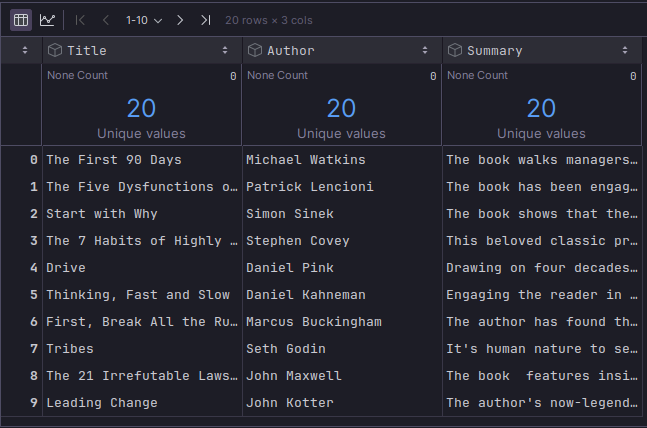
For this demonstration, we will leverage an in-memory vector store. Also, we will handcraft a small dataset containing data on some popular leadership books.
The following illustration depicts the truncated contents of the small leadership books dataset:
The pipe-separated leadership books dataset can be downloaded from HERE !!!
The following is the java POJO class that represents a leadership book from the above dataset:
/*
 * Name:   Book
 * Author: Bhaskar S
 * Date:   12/30/2025
 * Blog:   https://polarsparc.github.io
 */
package com.polarsparc.langchain4j.model;

public record Book(String title, String author) {}
The following is the Spring Boot service class that loads each of the leadership books as a document (with metadata) into an in-memory vector store (as embeddings) using the LLM model running on the Ollama platform and exposes a method to interact with the vector store for similarity search:
/*
 * Name:   VectorEmbeddingService
 * Author: Bhaskar S
 * Date:   12/30/2025
 * Blog:   https://polarsparc.github.io
 */

package com.polarsparc.langchain4j.service;

import com.polarsparc.langchain4j.model.Book;
import dev.langchain4j.data.document.Metadata;
import dev.langchain4j.data.embedding.Embedding;
import dev.langchain4j.data.segment.TextSegment;
import dev.langchain4j.model.embedding.EmbeddingModel;
import dev.langchain4j.store.embedding.EmbeddingMatch;
import dev.langchain4j.store.embedding.EmbeddingSearchRequest;
import dev.langchain4j.store.embedding.EmbeddingSearchResult;
import dev.langchain4j.store.embedding.inmemory.InMemoryEmbeddingStore;
import org.slf4j.Logger;
import org.slf4j.LoggerFactory;
import org.springframework.beans.factory.annotation.Qualifier;
import org.springframework.stereotype.Service;
import org.springframework.util.ResourceUtils;

import java.io.BufferedReader;
import java.io.FileReader;
import java.util.ArrayList;
import java.util.List;

@Service
public class VectorSearchService {
  private static final Logger LOGGER = LoggerFactory.getLogger(VectorSearchService.class);

  private final EmbeddingModel embeddingModel;
  private final InMemoryEmbeddingStore<TextSegment> embeddingStore;

  public VectorSearchService(@Qualifier("ollamaEmbeddingModel") EmbeddingModel embeddingModel) {
    this.embeddingModel = embeddingModel;
    this.embeddingStore = new InMemoryEmbeddingStore<>();
    loadBooksDataset();
  }

  public List<Book> similaritySearch(String query, int topK) {
    LOGGER.info("Performing similarity search for query: {}", query);

    Embedding queryEmbedding = embeddingModel.embed(query).content();

    EmbeddingSearchRequest request = EmbeddingSearchRequest.builder()
            .queryEmbedding(queryEmbedding)
            .maxResults(topK)
            .build();

    EmbeddingSearchResult<TextSegment> result = embeddingStore.search(request);

    List<Book> documents = new ArrayList<>();
    for (EmbeddingMatch<TextSegment> match : result.matches()) {
      TextSegment segment = match.embedded();
      documents.add(new Book(segment.metadata().getString("title"), segment.metadata().getString("author")));
    }

    return documents;
  }

  private void loadBooksDataset() {
    String booksDataset = "data/leadership_books.csv";

    LOGGER.info("Loading books dataset from: {}", booksDataset);

    try (BufferedReader reader = new BufferedReader(new FileReader(ResourceUtils.getFile("classpath:"+booksDataset)))) {
      String line;
      boolean isHeader = true;
      while ((line = reader.readLine()) != null) {
        if (isHeader) {
          isHeader = false;
          continue;
        }
        String[] parts = line.split("\\|");
        if (parts.length >= 3) {
          String title = parts[0].trim();
          String author = parts[1].trim();
          String summary = parts[2].trim();

          TextSegment segment = TextSegment.from(
            summary,
            Metadata.from("title", title).put("author", author)
          );

          Embedding embedding = embeddingModel.embed(segment).content();
          embeddingStore.add(embedding, segment);
        }
      }

      LOGGER.info("Books dataset loaded successfully");
    } catch (Exception ex) {
      LOGGER.error("Failed to load books dataset", ex);
    }
  }
}
The following is the Spring Boot controller class that exposes a REST endpoint /api/v1/vectorsearch to invoke the service method:
/*
 * Name:   VectorEmbeddingController
 * Author: Bhaskar S
 * Date:   12/30/2025
 * Blog:   https://polarsparc.github.io
 */

package com.polarsparc.langchain4j.controller;

import com.polarsparc.langchain4j.model.Book;
import com.polarsparc.langchain4j.service.VectorSearchService;
import com.fasterxml.jackson.databind.ObjectMapper;
import org.slf4j.Logger;
import org.slf4j.LoggerFactory;
import org.springframework.http.ResponseEntity;
import org.springframework.web.bind.annotation.*;

import java.util.List;

@RestController
@RequestMapping("/api/v1")
public class VectorSearchController {
  private static final Logger LOGGER = LoggerFactory.getLogger(VectorSearchController.class);

  private final ObjectMapper objectMapper;
  private final VectorSearchService vectorSearchService;

  public VectorSearchController(VectorSearchService vectorSearchService) {
    this.objectMapper = new ObjectMapper();
    this.vectorSearchService = vectorSearchService;
  }

  @PostMapping("/vectorsearch")
  public ResponseEntity<String> similaritySearch(@RequestBody String message) {
    List<Book> documents = vectorSearchService.similaritySearch(message, 2);

    String json = "[]";
    try {
      json = objectMapper.writeValueAsString(documents);
    } catch (Exception ex) {
      LOGGER.error("Failed to serialize documents", ex);
    }

    return ResponseEntity.ok(json);
  }
}
Again, to start the main Java AI application from Listing.1, run the following command in the open terminal:
$ mvn spring-boot:run
To send a message as input to the Ollama chat model for similarity search, execute the following command:
$ curl -s -X POST http://localhost:8080/api/v1/vectorsearch -d "guide to managing teams" | jq
The following would be the typical output:
[
  {
    "title": "The Five Dysfunctions of a Team",
    "author": "Patrick Lencioni"
  },
  {
    "title": "Start with Why",
    "author": "Simon Sinek"
  }
]
Again, we will stop the running Java AI application.
Moving on to the fourth use-case on keeping a history of all the conversations so that the chat model remembers the context of the interactions.
The following is the Spring Boot service class that exposes a method to interact with the LLM model running on the Ollama platform which preserves response(s) from the previous interaction(s) in an in-memory store:
/*
 * Name:   ChatHistoryService
 * Author: Bhaskar S
 * Date:   12/31/2025
 * Blog:   https://polarsparc.github.io
 */

package com.polarsparc.langchain4j.service;

import dev.langchain4j.data.message.AiMessage;
import dev.langchain4j.memory.ChatMemory;
import dev.langchain4j.memory.chat.MessageWindowChatMemory;
import dev.langchain4j.model.chat.ChatModel;
import dev.langchain4j.model.chat.response.ChatResponse;
import dev.langchain4j.service.AiServices;
import dev.langchain4j.service.SystemMessage;
import dev.langchain4j.service.UserMessage;
import dev.langchain4j.store.memory.chat.ChatMemoryStore;
import dev.langchain4j.store.memory.chat.InMemoryChatMemoryStore;
import org.slf4j.Logger;
import org.slf4j.LoggerFactory;
import org.springframework.beans.factory.annotation.Qualifier;
import org.springframework.stereotype.Service;

@Service
public class ChatHistoryService {
  private static final Logger LOGGER = LoggerFactory.getLogger(ChatHistoryService.class);

  private final ChatModel chatModel;
  private final ChatAssistant chatAssistant;

  public ChatHistoryService(@Qualifier("ollamaChatModel") ChatModel chatModel) {
    this.chatModel = chatModel;
    this.chatAssistant = setUpChatAssistantWithMemory();
  }

  public String chatWithHistory(String userMessage) {
    LOGGER.info("Processing chat request with -> user prompt: {}", userMessage);

    ChatResponse response = chatAssistant.chat(userMessage);
    AiMessage aiMessage = response.aiMessage();

    LOGGER.info("Chat response generated successfully -> {}", aiMessage.text());

    return aiMessage.text();
  }

  private ChatAssistant setUpChatAssistantWithMemory() {
    ChatMemoryStore chatMemoryStore = new InMemoryChatMemoryStore();

    ChatMemory chatMemory = MessageWindowChatMemory.builder()
        .id("uid-1")
        .maxMessages(10)
        .chatMemoryStore(chatMemoryStore)
        .build();

    return AiServices.builder(ChatAssistant.class)
        .chatModel(chatModel)
        .chatMemory(chatMemory)
        .build();
  }

  interface ChatAssistant {
    @SystemMessage("You are a helpful assistant.")
    ChatResponse chat(@UserMessage String userMessage);
  }
}
The following is the Spring Boot controller class that exposes a REST endpoint /api/v1/chathistory to invoke the service method:
/*
 * Name:   ChatHistoryController
 * Author: Bhaskar S
 * Date:   12/31/2025
 * Blog:   https://polarsparc.github.io
 */

package com.polarsparc.langchain4j.controller;

import com.polarsparc.langchain4j.service.ChatHistoryService;
import org.springframework.http.ResponseEntity;
import org.springframework.web.bind.annotation.*;

@RestController
@RequestMapping("/api/v1")
public class ChatHistoryController {
  private final ChatHistoryService chatHistoryService;

  public ChatHistoryController(ChatHistoryService chatHistoryService) {
    this.chatHistoryService = chatHistoryService;
  }

  @PostMapping("/chathistory")
  public ResponseEntity<String> simpleChat(@RequestBody String message) {
    String response = chatHistoryService.chatWithHistory(message);
    return ResponseEntity.ok(response);
  }
}
One more time, to start the main Java AI application from Listing.1, run the following command in the open terminal:
$ mvn spring-boot:run
To send a message as input to the Ollama chat model (with memory), execute the following command:
$ curl -s -X POST http://localhost:8080/api/v1/chathistory -d "Suggest the most popular top 3 leadership quotes"
The following would be the typical output:
```json
{
  "aiMessage": {
    "text": "Sure! Here are the top three leadership quotes:\n1. 'Leadership is not about being in charge; it's about taking care of those in your charge.' - Simon Sinek\n2. 'The greatest leader isn't head of a company, but rather someone who can inspire others to achieve greatness beyond themselves.' - Tony Robbins\n3. 'Leaders are one step ahead because they see the future before it happens and act on that vision now.' - Peter Drucker",
    "thinking": "",
    "toolExecutionRequests": [],
    "attributes": {}
  },
  "metadata": {
    "id": "1a2b3c4d5e6f7g8h9i0jklmnopqrstuvwxzyz012345678901234567890123456789012",
    "modelName": "ChatGPT",
    "tokenUsage": {
      "inputTokenCount": 150,
      "outputTokenCount": 300,
      "totalTokenCount": 450
    },
    "finishReason": "CONTENT_FILTER"
  }
}
```
To check if the chat model remembers the previous context, send another message as input to the chat model by executing the following command:
$ curl -s -X POST http://localhost:8080/api/v1/chathistory -d "Quotes too long and are not that inspiring. Can you try again?"
The following would be the typical output:
```json
{
  "aiMessage": {
    "text": "Apologies for the previous response. Here are three concise and inspiring leadership quotes:\n1. 'Leadership is a journey, not a destination.' - Steve Jobs\n2. 'A leader fails when he stops leading; success happens only with continued effort in guiding others to their goals.' - Tony Robbins\n3. 'The best way to predict the future is to create it.' - Peter Drucker",
    "thinking": "",
    "toolExecutionRequests": [],
    "attributes": {}
  },
  "metadata": {
    "id": "1a2b3c4d5e6f7g8h9i0jklmnopqrstuvwxzyz012345678901234567890123456789012",
    "modelName": "ChatGPT",
    "tokenUsage": {
      "inputTokenCount": 120,
      "outputTokenCount": 240,
      "totalTokenCount": 360
    },
    "finishReason": "CONTENT_FILTER"
  }
}
```
One more time, we will stop the running Java AI application.
For the fifth use-case we will move on to the topic of leveraging LangChain4J for building agents that can perform specific tasks using provided external tool(s). For this use-case, we will use the IBM Granite 4 model.
The following is the java class that represents an external tool to execute a shell command:
/*
 * Name:   ShellCommandTool
 * Author: Bhaskar S
 * Date:   12/31/2025
 * Blog:   https://polarsparc.github.io
 */

package com.polarsparc.langchain4j.util;

import dev.langchain4j.agent.tool.Tool;
import org.slf4j.Logger;
import org.slf4j.LoggerFactory;
import org.springframework.stereotype.Component;

import java.io.BufferedReader;
import java.io.InputStreamReader;
import java.util.concurrent.TimeUnit;

@Component
public class ShellCommandTool {
  private static final Logger LOGGER = LoggerFactory.getLogger(ShellCommandTool.class);

  @Tool("Execute shell commands on the system. Use this to to execute any system command, etc.")
  public String executeShellCommand(String command) {
    LOGGER.info("Executing shell command: {}", command);

    try {
      ProcessBuilder processBuilder = new ProcessBuilder();
      processBuilder.command("bash", "-c", command);
      processBuilder.redirectErrorStream(true);

      Process process = processBuilder.start();

      StringBuilder output = new StringBuilder();
      try (BufferedReader reader = new BufferedReader(new InputStreamReader(process.getInputStream()))) {
        String line;
        while ((line = reader.readLine()) != null) {
          output.append(line).append("\n");
        }
      }

      boolean finished = process.waitFor(30, TimeUnit.SECONDS);
      if (!finished) {
        process.destroyForcibly();
        return "Error: Command timed out after 30 seconds";
      }

      int exitCode = process.exitValue();
      if (exitCode != 0) {
        return "Error executing command. Exit code: " + exitCode + "\nOutput: " + output;
      }

      return output.toString().trim();
    } catch (Exception ex) {
      LOGGER.error("Error executing shell command", ex);
      return "Error: " + ex.getMessage();
    }
  }
}
The following is the Spring Boot service class that exposes a method to interact with the LLM model running on the Ollama platform with access to the supplied external tool:
/*
 * Name:   ToolsAgentService
 * Author: Bhaskar S
 * Date:   12/31/2025
 * Blog:   https://polarsparc.github.io
 */

package com.polarsparc.langchain4j.service;

import com.polarsparc.langchain4j.util.ShellCommandTool;
import dev.langchain4j.data.message.AiMessage;
import dev.langchain4j.memory.ChatMemory;
import dev.langchain4j.memory.chat.MessageWindowChatMemory;
import dev.langchain4j.model.chat.ChatModel;
import dev.langchain4j.model.chat.response.ChatResponse;
import dev.langchain4j.service.AiServices;
import dev.langchain4j.service.SystemMessage;
import dev.langchain4j.service.UserMessage;
import dev.langchain4j.store.memory.chat.ChatMemoryStore;
import dev.langchain4j.store.memory.chat.InMemoryChatMemoryStore;
import org.slf4j.Logger;
import org.slf4j.LoggerFactory;
import org.springframework.beans.factory.annotation.Qualifier;
import org.springframework.stereotype.Service;

@Service
public class ToolsAgentService {
  private static final String SYSTEM_PROMPT = """
          You are a helpful assistant. Be concise and accurate.
          You have access to tools that you can use to execute shell commands.
          Use these tools to answer the user's question.
          Only respond with the relevant information from the command execution.
          """;

  private static final Logger LOGGER = LoggerFactory.getLogger(ToolsAgentService.class);

  private final ChatModel chatModel;
  private final ChatAssistant chatAssistant;

  public ToolsAgentService(@Qualifier("ollamaToolsModel") ChatModel chatModel) {
    this.chatModel = chatModel;
    this.chatAssistant = setUpToolAgentWithMemory();
  }

  public String agentChat(String userMessage) {
    LOGGER.info("Processing chat request with -> user prompt: {}", userMessage);

    ChatResponse response = chatAssistant.chat(userMessage);
    AiMessage aiMessage = response.aiMessage();

    LOGGER.info("Chat response generated successfully -> {}", aiMessage.text());

    return aiMessage.text();
  }

  private ChatAssistant setUpToolAgentWithMemory() {
    ChatMemoryStore chatMemoryStore = new InMemoryChatMemoryStore();

    ChatMemory chatMemory = MessageWindowChatMemory.builder()
            .id("agent-1")
            .maxMessages(10)
            .chatMemoryStore(chatMemoryStore)
            .build();

    return AiServices.builder(ChatAssistant.class)
            .chatModel(chatModel)
            .chatMemory(chatMemory)
            .tools(new ShellCommandTool())
            .build();
  }

  interface ChatAssistant {
    @SystemMessage(SYSTEM_PROMPT)
    ChatResponse chat(@UserMessage String userMessage);
  }
}
The following is the Spring Boot controller class that exposes a REST endpoint /api/v1/agentchat to invoke the service method:
/*
 * Name:   ToolsAgentController
 * Author: Bhaskar S
 * Date:   12/31/2025
 * Blog:   https://polarsparc.github.io
 */

package com.polarsparc.langchain4j.controller;

import com.polarsparc.langchain4j.service.ToolsAgentService;
import org.springframework.http.ResponseEntity;
import org.springframework.web.bind.annotation.PostMapping;
import org.springframework.web.bind.annotation.RequestBody;
import org.springframework.web.bind.annotation.RequestMapping;
import org.springframework.web.bind.annotation.RestController;

@RestController
@RequestMapping("/api/v1")
public class ToolsAgentController {
  private final ToolsAgentService toolsAgentService;

  public ToolsAgentController(ToolsAgentService toolsAgentService) {
    this.toolsAgentService = toolsAgentService;
  }

  @PostMapping("/agentchat")
  public ResponseEntity<String> agentChat(@RequestBody String message) {
    String response = toolsAgentService.agentChat(message);
    return ResponseEntity.ok(response);
  }
}
Again, to start the main Java AI application from Listing.1, run the following command in the open terminal:
$ mvn spring-boot:run
To send a message as input to the Ollama chat model (with access to an external tool), execute the following command:
$ curl -s -X POST http://localhost:8080/api/v1/agentchat -d "Can you identify all the network interfaces on this system?"
The following would be the typical output:
The network interfaces on this system are: `docker0`, `enp42s0`, `lo`, `vetha9f8360`, and `wlo1`.
To send another message to the chat model (with tool access), execute the following command:
$ curl -s -X POST http://localhost:8080/api/v1/agentchat -d "What is the primary Ethernet interface on this system?"
The following would be the typical output:
The primary Ethernet interface on this system is `enp42s0`.
With this, we conclude the hands-on demonstration of using the various LangChain4J features !!!
The code repository for this article can be found HERE !!!
References