Figure.1
| PolarSPARC |
Hands-on MCP using Spring AI
| Bhaskar S | 01/10/2026 |
Overview
Model Context Protocol (or MCP for short) is an open protocol that enables seamless integration between the LLM apps and the external systems (databases, files, etc) and tools (github, servicenow, etc).
The MCP specification consists of the following core components:
The intent of this article is NOT to be exhaustive, but a primer to get started quickly.
Installation and Setup
The installation and setup will be on a Ubuntu 24.04 LTS based Linux desktop. Ensure that Ollama is installed and setup on the desktop (see instructions).
Further, ensure at least Java 21 or above is installed and setup. In addition, ensure Apache Maven is installed and setup.
We will use Spring AI with Spring Boot for the demonstrations in this article.
From the MCP Inspector github RESPOSITORY, one can identify the current release version of the inspector. At the time of this article, the release version was 0.18.0.
To pull and download the docker image for the MCP Inspector, execute the following command in a terminal window:
$ docker pull ghcr.io/modelcontextprotocol/inspector:0.18.0/p>
The following should be the typical output:
0.18.0: Pulling from modelcontextprotocol/inspector
ae4ce04d0e1c: Pull complete
85ce34a7f114: Pull complete
21f205f4b728: Pull complete
172c9e1a3e90: Pull complete
79cdc6cbeb68: Pull complete
6e09ae90c8ab: Pull complete
839c794e5436: Pull complete
9e7ac5986a8a: Pull complete
3ab50c87739e: Pull complete
700895ffb7ba: Pull complete
bf2ae1961a4c: Pull complete
d4f0be0e8239: Pull complete
cac4aec1f27c: Pull complete
b93054334b26: Pull complete
f58d87d1235b: Pull complete
b42421530f57: Pull complete
Digest: sha256:d4fda7b69cb8ae4cd9d3ac5b24bea59defc0555b59f90c9b5197c92968f65af1
Status: Downloaded newer image for ghcr.io/modelcontextprotocol/inspector:0.18.0
ghcr.io/modelcontextprotocol/inspector:0.18.0
Assuming that the ip address on the Linux desktop is 192.168.1.25, start the Ollama platform by executing the following command in the terminal window:
$ docker run --rm --name ollama -p 192.168.1.25:11434:11434 -v $HOME/.ollama:/root/.ollama ollama/ollama:0.13.5
If the linux desktop has Nvidia GPU with decent amount of VRAM (at least 16 GB) and has been enabled for use with docker (see instructions), then execute the following command instead to start Ollama:
$ docker run --rm --name ollama --gpus=all -p 192.168.1.25:11434:11434 -v $HOME/.ollama:/root/.ollama ollama/ollama:0.13.5
For the LLM models, we will be using the IBM Granite 4 Micro model for the tools execution.
Open a new terminal window and execute the following docker command to download the IBM Granite 4 Micro model:
$ docker exec -it ollama ollama run granite4:micro
After the model download, to exit the user input, execute the following user prompt:
>>> /bye
Let us assume the root directory for the Java project $HOME/java/SpringAIMCP .
The following is the listing for the parent Maven project file pom.xml:
<?xml version="1.0" encoding="UTF-8"?>
<project xmlns="http://maven.apache.org/POM/4.0.0" xmlns:xsi="http://www.w3.org/2001/XMLSchema-instance"
         xsi:schemaLocation="http://maven.apache.org/POM/4.0.0 https://maven.apache.org/xsd/maven-4.0.0.xsd">
  <modelVersion>4.0.0</modelVersion>

  <name>SpringAIMCP</name>
  <description>SpringAIMCP</description>
  <groupId>com.polarsparc</groupId>
  <artifactId>SpringAIMCP</artifactId>
  <version>1.0</version>
  <packaging>pom</packaging>

  <parent>
    <groupId>org.springframework.boot</groupId>
    <artifactId>spring-boot-starter-parent</artifactId>
    <version>3.5.9</version>
    <relativePath/> <!-- lookup parent from repository -->
  </parent>

  <properties>
    <java.version>21</java.version>
    <spring-ai.version>1.1.2</spring-ai.version>
  </properties>

  <dependencies>
    <dependency>
      <groupId>org.springframework.boot</groupId>
      <artifactId>spring-boot-starter-test</artifactId>
      <scope>test</scope>
    </dependency>
  </dependencies>

  <dependencyManagement>
    <dependencies>
      <dependency>
        <groupId>org.springframework.ai</groupId>
        <artifactId>spring-ai-bom</artifactId>
        <version>${spring-ai.version}</version>
        <type>pom</type>
        <scope>import</scope>
      </dependency>
    </dependencies>
  </dependencyManagement>

  <build>
    <plugins>
      <plugin>
        <groupId>org.springframework.boot</groupId>
        <artifactId>spring-boot-maven-plugin</artifactId>
      </plugin>
    </plugins>
  </build>
</project>
This completes all the system installation and setup for the MCP using Spring AI hands-on demonstration.
Hands-on with MCP using Spring AI
We will first implement the MCP Server that will expose two interest calculator tools - one for simple interest and the other for compound interest.
MCP Server
Let us assume the top directory for the MCP server is $HOME/java/SpringAIMCP/InterestMcpServer.
The following is the listing for the Maven project file pom.xml that will be used by the MCP server:
<?xml version="1.0" encoding="UTF-8"?>
<project xmlns="http://maven.apache.org/POM/4.0.0" xmlns:xsi="http://www.w3.org/2001/XMLSchema-instance"
         xsi:schemaLocation="http://maven.apache.org/POM/4.0.0 https://maven.apache.org/xsd/maven-4.0.0.xsd">
  <modelVersion>4.0.0</modelVersion>

  <name>InterestMcpServer</name>
  <description>InterestMcpServer</description>
  <artifactId>InterestMcpServer</artifactId>

  <parent>
    <groupId>com.polarsparc</groupId>
    <artifactId>SpringAIMCP</artifactId>
    <version>1.0</version>
  </parent>

  <dependencies>
    <dependency>
      <groupId>org.springframework.ai</groupId>
      <artifactId>spring-ai-starter-mcp-server-webmvc</artifactId>
    </dependency>
  </dependencies>
</project>
The following is the listing for the logger properties file simplelogger.properties located in the directory src/main/resources:
#
### SLF4J Simple Logger properties
#
org.slf4j.simpleLogger.defaultLogLevel=info
org.slf4j.simpleLogger.showDateTime=true
org.slf4j.simpleLogger.dateTimeFormat=yyyy-MM-dd HH:mm:ss:SSS
org.slf4j.simpleLogger.showThreadName=true
The following is the listing for the Spring Boot application properties file application.properties located in the directory src/main/resources:
spring.main.banner-mode=off
spring.application.name=InterestMcpServer
server.port=8000
spring.ai.mcp.server.name=interest-calculator
spring.ai.mcp.server.version=1.0
spring.ai.mcp.server.annotation-scanner.enabled=true
spring.ai.mcp.server.type=sync
spring.ai.mcp.server.protocol=streamable
spring.ai.mcp.server.streamable-http.keep-alive-interval=30s
The following is the main Spring Boot application to start-up the MCP server:
/*
 * Name:   InterestMcpServerApplication
 * Author: Bhaskar S
 * Date:   01/09/2026
 * Blog:   https://polarsparc.github.io
 */

package com.polarsparc.interestmcpserver;

import org.springframework.boot.SpringApplication;
import org.springframework.boot.autoconfigure.SpringBootApplication;

@SpringBootApplication
public class InterestMcpServerApplication {
  public static void main(String[] args) {
    SpringApplication.run(InterestMcpServerApplication.class, args);
  }
}
The following is the Spring Boot service class that defines the two interest calculator tools (one for simple interest and the other for compound interest):
/*
 * Name:   InterestServerService
 * Author: Bhaskar S
 * Date:   01/09/2026
 * Blog:   https://polarsparc.github.io
 */

package com.polarsparc.interestmcpserver.service;

import org.slf4j.Logger;
import org.slf4j.LoggerFactory;
import org.springframework.ai.tool.annotation.Tool;
import org.springframework.ai.tool.annotation.ToolParam;
import org.springframework.stereotype.Service;

@Service
public class InterestServerService {
  private static final Logger LOGGER = LoggerFactory.getLogger(InterestServerService.class);

  @Tool(name="Simple-Interest", description="Tool to compute simple interest rate for a year.")
  public float annualSimpleInterest(@ToolParam(description="Principal Amount", required=true) float principal,
                                    @ToolParam(description="Interest Rate", required=true) float rate) {
    LOGGER.info("Simple interest -> Principal: {}, Rate: {}", principal, rate);
    return principal * rate / 100.00f;
  }

  @Tool(name="Compound-Interest", description="Tool to compute compound interest rate for a year.")
  public float annualCompoundInterest(@ToolParam(description="Principal Amount", required=true) float principal,
                                      @ToolParam(description="Interest Rate", required=true) float rate) {
    LOGGER.info("Compound interest -> Principal: {}, Rate: {}", principal, rate);
    return principal * (1 + rate / 100.0f);
  }
}
Note that the annotation @Tool declaratively exposes Java methods as external tool(s) for the LLM model to call on.
The following is the Spring Boot configuration class, which registers tool provider beans (instances of type ToolCallback) with Spring so that to LLM models can discover and execute external tools:
/*
 * Name:   InterestServerConfig
 * Author: Bhaskar S
 * Date:   01/09/2026
 * Blog:   https://polarsparc.github.io
 */

package com.polarsparc.interestmcpserver.config;

import com.polarsparc.interestmcpserver.service.InterestServerService;
import org.springframework.ai.tool.ToolCallbackProvider;
import org.springframework.ai.tool.method.MethodToolCallbackProvider;
import org.springframework.context.annotation.Bean;
import org.springframework.context.annotation.Configuration;

@Configuration
public class InterestServerConfig {
  @Bean
  public ToolCallbackProvider interestCalculatorTools(InterestServerService interestCalculatorService) {
    return MethodToolCallbackProvider.builder().toolObjects(interestCalculatorService).build();
  }
}
Note that the tool provider implementation MethodToolCallbackProvider looks at classes for methods with the @Tool annotation to identify external tool(s).
To start the MCP server exposing the interest calculator tools, open a terminal window and run the following commands:
$ cd $HOME/java/SprinAIMCP/InterestMcpServer
$ mvn spring-boot:run
The following should be the typical output:
[INFO] Scanning for projects...
[INFO]
[INFO] ------------------< com.polarsparc:InterestMcpServer >------------------
[INFO] Building InterestMcpServer 1.0
[INFO]   from pom.xml
[INFO] --------------------------------[ jar ]---------------------------------
[INFO]
[INFO] >>> spring-boot:3.5.9:run (default-cli) > test-compile @ InterestMcpServer >>>
[INFO]
[INFO] --- resources:3.3.1:resources (default-resources) @ InterestMcpServer ---
[INFO] Copying 1 resource from src/main/resources to target/classes
[INFO] Copying 1 resource from src/main/resources to target/classes
[INFO]
[INFO] --- compiler:3.14.1:compile (default-compile) @ InterestMcpServer ---
[INFO] Nothing to compile - all classes are up to date.
[INFO]
[INFO] --- resources:3.3.1:testResources (default-testResources) @ InterestMcpServer ---
[INFO] skip non existing resourceDirectory /home/polarsparc/java/SpringAIMCP/InterestMcpServer/src/test/resources
[INFO]
[INFO] --- compiler:3.14.1:testCompile (default-testCompile) @ InterestMcpServer ---
[INFO] Nothing to compile - all classes are up to date.
[INFO]
[INFO] <<< spring-boot:3.5.9:run (default-cli) < test-compile @ InterestMcpServer <<<
[INFO]
[INFO] --- spring-boot:3.5.9:run (default-cli) @ InterestMcpServer ---
[INFO] Attaching agents: []
2026-01-09T20:25:18.268-05:00  INFO 19837 --- [InterestMcpServer] [           main] c.p.i.InterestMcpServerApplication       : Starting InterestMcpServerApplication using Java 25 with PID 19837 (/home/polarsparc/java/SpringAIMCP/InterestMcpServer/target/classes started by bswamina in /home/polarsparc/java/SpringAIMCP/InterestMcpServer)
2026-01-09T20:25:18.270-05:00  INFO 19837 --- [InterestMcpServer] [           main] c.p.i.InterestMcpServerApplication       : No active profile set, falling back to 1 default profile: "default"
2026-01-09T20:25:18.626-05:00  WARN 19837 --- [InterestMcpServer] [           main] trationDelegate$BeanPostProcessorChecker : Bean 'org.springframework.ai.mcp.server.common.autoconfigure.annotations.McpServerAnnotationScannerAutoConfiguration' of type [org.springframework.ai.mcp.server.common.autoconfigure.annotations.McpServerAnnotationScannerAutoConfiguration] is not eligible for getting processed by all BeanPostProcessors (for example: not eligible for auto-proxying). Is this bean getting eagerly injected/applied to a currently created BeanPostProcessor [serverAnnotatedMethodBeanPostProcessor]? Check the corresponding BeanPostProcessor declaration and its dependencies/advisors. If this bean does not have to be post-processed, declare it with ROLE_INFRASTRUCTURE.
2026-01-09T20:25:18.626-05:00  WARN 19837 --- [InterestMcpServer] [           main] trationDelegate$BeanPostProcessorChecker : Bean 'serverAnnotatedBeanRegistry' of type [org.springframework.ai.mcp.server.common.autoconfigure.annotations.McpServerAnnotationScannerAutoConfiguration$ServerMcpAnnotatedBeans] is not eligible for getting processed by all BeanPostProcessors (for example: not eligible for auto-proxying). Is this bean getting eagerly injected/applied to a currently created BeanPostProcessor [serverAnnotatedMethodBeanPostProcessor]? Check the corresponding BeanPostProcessor declaration and its dependencies/advisors. If this bean does not have to be post-processed, declare it with ROLE_INFRASTRUCTURE.
2026-01-09T20:25:18.633-05:00  WARN 19837 --- [InterestMcpServer] [           main] trationDelegate$BeanPostProcessorChecker : Bean 'spring.ai.mcp.server.annotation-scanner-org.springframework.ai.mcp.server.common.autoconfigure.annotations.McpServerAnnotationScannerProperties' of type [org.springframework.ai.mcp.server.common.autoconfigure.annotations.McpServerAnnotationScannerProperties] is not eligible for getting processed by all BeanPostProcessors (for example: not eligible for auto-proxying). Is this bean getting eagerly injected/applied to a currently created BeanPostProcessor [serverAnnotatedMethodBeanPostProcessor]? Check the corresponding BeanPostProcessor declaration and its dependencies/advisors. If this bean does not have to be post-processed, declare it with ROLE_INFRASTRUCTURE.
2026-01-09T20:25:18.754-05:00  INFO 19837 --- [InterestMcpServer] [           main] o.s.b.w.embedded.tomcat.TomcatWebServer  : Tomcat initialized with port 8000 (http)
2026-01-09T20:25:18.763-05:00  INFO 19837 --- [InterestMcpServer] [           main] o.apache.catalina.core.StandardService   : Starting service [Tomcat]
2026-01-09T20:25:18.763-05:00  INFO 19837 --- [InterestMcpServer] [           main] o.apache.catalina.core.StandardEngine    : Starting Servlet engine: [Apache Tomcat/10.1.50]
2026-01-09T20:25:18.788-05:00  INFO 19837 --- [InterestMcpServer] [           main] o.a.c.c.C.[Tomcat].[localhost].[/]       : Initializing Spring embedded WebApplicationContext
2026-01-09T20:25:18.789-05:00  INFO 19837 --- [InterestMcpServer] [           main] w.s.c.ServletWebServerApplicationContext : Root WebApplicationContext: initialization completed in 489 ms
2026-01-09T20:25:19.123-05:00  WARN 19837 --- [InterestMcpServer] [           main] o.s.m.provider.tool.SyncMcpToolProvider  : No tool methods found in the provided tool objects: []
2026-01-09T20:25:19.128-05:00  INFO 19837 --- [InterestMcpServer] [           main] o.s.a.m.s.c.a.McpServerAutoConfiguration : Enable tools capabilities, notification: true
2026-01-09T20:25:19.129-05:00  INFO 19837 --- [InterestMcpServer] [           main] o.s.a.m.s.c.a.McpServerAutoConfiguration : Registered tools: 2
2026-01-09T20:25:19.129-05:00  INFO 19837 --- [InterestMcpServer] [           main] o.s.a.m.s.c.a.McpServerAutoConfiguration : Enable resources capabilities, notification: true
2026-01-09T20:25:19.129-05:00  INFO 19837 --- [InterestMcpServer] [           main] o.s.a.m.s.c.a.McpServerAutoConfiguration : Enable resources templates capabilities, notification: true
2026-01-09T20:25:19.130-05:00  INFO 19837 --- [InterestMcpServer] [           main] o.s.a.m.s.c.a.McpServerAutoConfiguration : Enable prompts capabilities, notification: true
2026-01-09T20:25:19.130-05:00  INFO 19837 --- [InterestMcpServer] [           main] o.s.a.m.s.c.a.McpServerAutoConfiguration : Enable completions capabilities
2026-01-09T20:25:19.201-05:00  INFO 19837 --- [InterestMcpServer] [           main] o.s.b.w.embedded.tomcat.TomcatWebServer  : Tomcat started on port 8000 (http) with context path '/'
2026-01-09T20:25:19.206-05:00  INFO 19837 --- [InterestMcpServer] [           main] c.p.i.InterestMcpServerApplication       : Started InterestMcpServerApplication in 1.153 seconds (process running for 1.31)
To validate the just started MCP server using the MCP Inspector, open a terminal window and run the following command:
$ docker run --rm --name mcp-inspector --network host ghcr.io/modelcontextprotocol/inspector:0.18.0
The following should be the typical output:
> @modelcontextprotocol/inspector@0.18.0 start
> node client/bin/start.js

Starting MCP inspector...
  Proxy server listening on localhost:6277
    Session token: ec1d1ab6762ddc410c04f93b931a72c4598dea43f775ace908446151df152c6c
    Use this token to authenticate requests or set DANGEROUSLY_OMIT_AUTH=true to disable auth

    MCP Inspector is up and running at:
    http://localhost:6274/?MCP_PROXY_AUTH_TOKEN=ec1d1ab6762ddc410c04f93b931a72c4598dea43f775ace908446151df152c6c
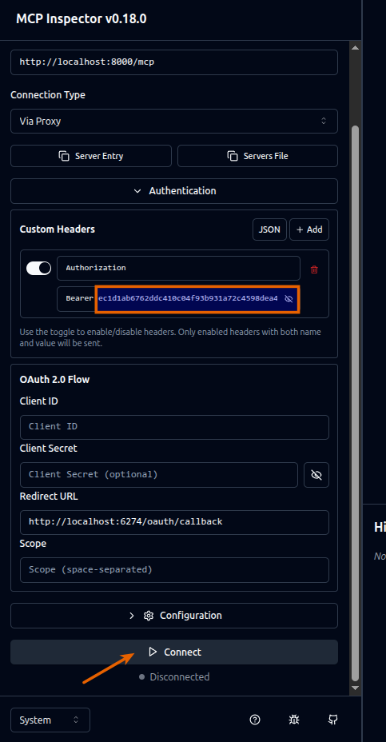
Make a note of the session token ec1d1ab6762ddc410c04f93b931a72c4598dea43f775ace908446151df152c6c as we will to use it to enter in the browser.
Open a browser window and paste the MCP Inspector URL from above.
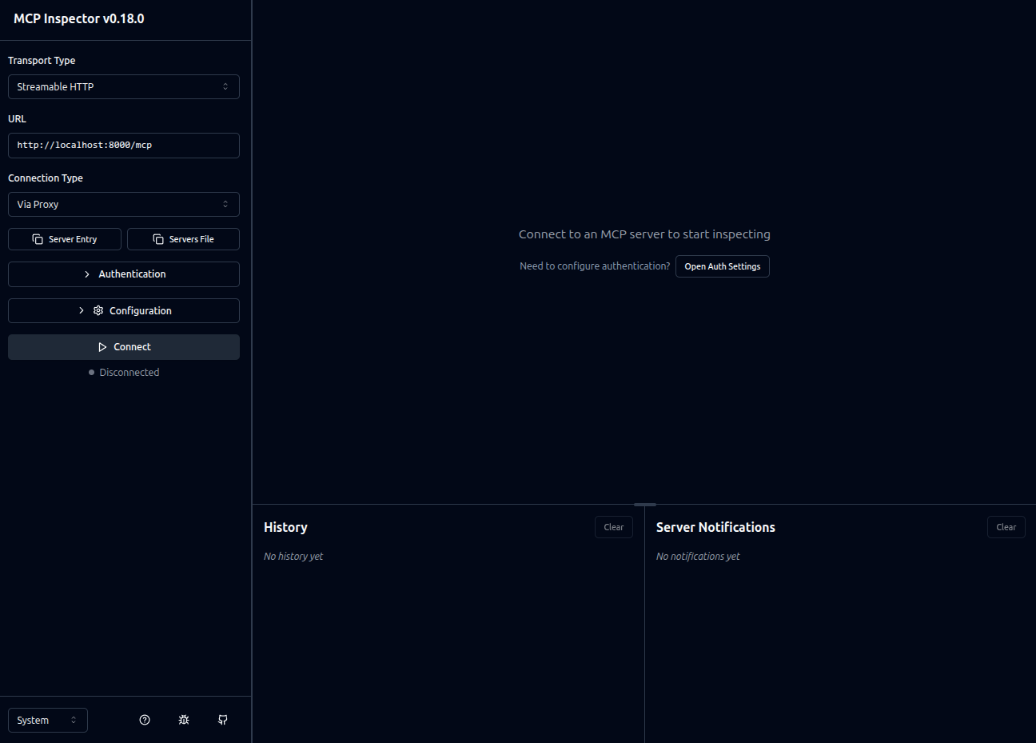
The following screenshot depicts the illustration of the MCP Inspector web application:
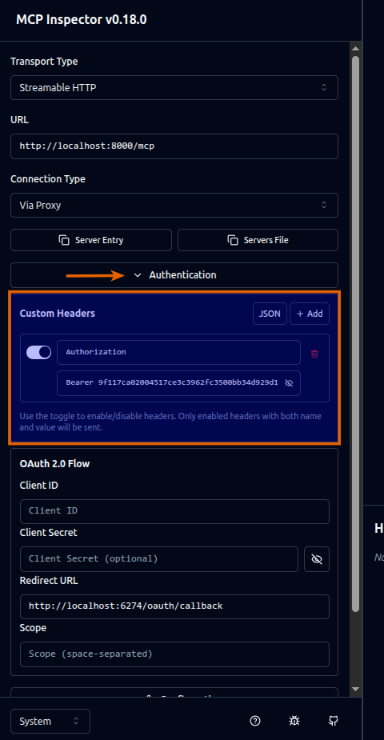
Click on the Authentication drop-down and it will open the Custom Headers section as depicted in the illustration below:
Replace the token string next to word Bearer with the session token and click on the Connect button as depicted in the illustration below:
After successful connection, click on the Tools, and then on Compound-Interest tool to display the option to execute the tool on the right will as depicted in the illustration below:
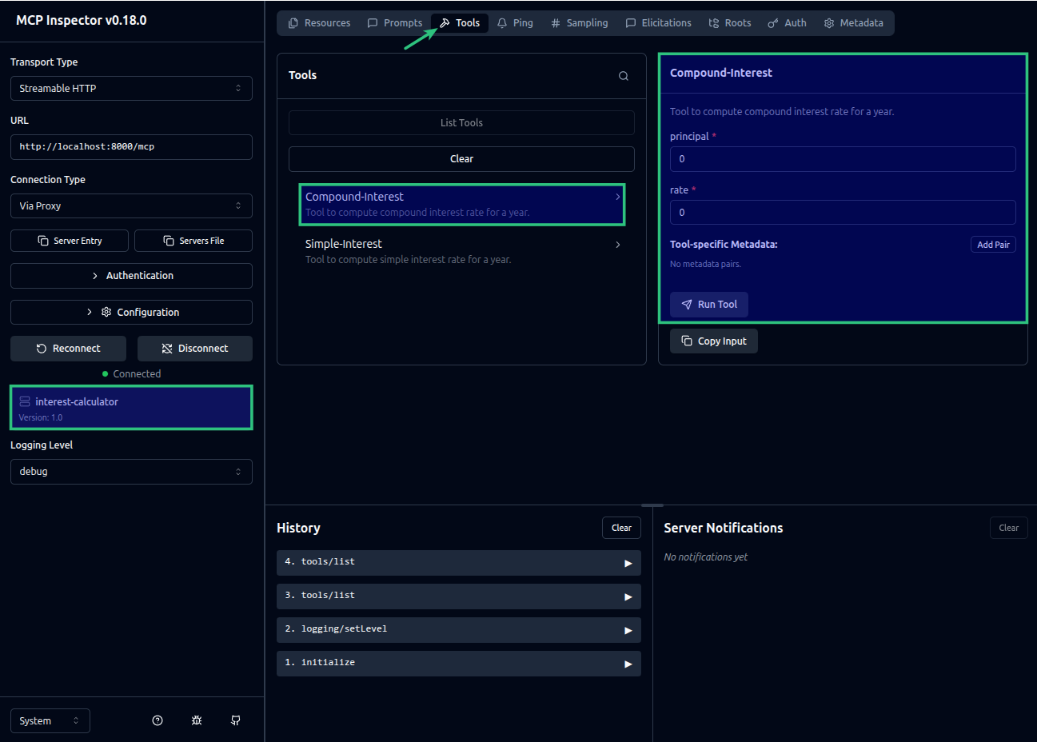
BOOM !!! The MCP Inspector has successfully detected the tools exposed by the MCP Server.
Next, we will implement the MCP Client, which will allow the Ollama LLM app to access the interest calculator tools when needed.
MCP Client
Let us assume the top directory for the MCP client is $HOME/java/SpringAIMCP/InterestMcpClient.
The following is the listing for the Maven project file pom.xml that will be used by the MCP client:
<?xml version="1.0" encoding="UTF-8"?>
<project xmlns="http://maven.apache.org/POM/4.0.0" xmlns:xsi="http://www.w3.org/2001/XMLSchema-instance"
         xsi:schemaLocation="http://maven.apache.org/POM/4.0.0 https://maven.apache.org/xsd/maven-4.0.0.xsd">
  <modelVersion>4.0.0</modelVersion>

  <name>InterestMcpClient</name>
  <description>InterestMcpClient</description>
  <artifactId>InterestMcpClient</artifactId>

  <parent>
    <groupId>com.polarsparc</groupId>
    <artifactId>SpringAIMCP</artifactId>
    <version>1.0</version>
  </parent>

  <dependencies>
    <dependency>
      <groupId>org.springframework.boot</groupId>
      <artifactId>spring-boot-starter-web</artifactId>
    </dependency>
    <dependency>
      <groupId>org.springframework.ai</groupId>
      <artifactId>spring-ai-starter-mcp-client</artifactId>
    </dependency>
    <dependency>
      <groupId>org.springframework.ai</groupId>
      <artifactId>spring-ai-starter-model-ollama</artifactId>
    </dependency>
  </dependencies>
</project>
The following is the listing for the logger properties file simplelogger.properties located in the directory src/main/resources:
#
### SLF4J Simple Logger properties
#
org.slf4j.simpleLogger.defaultLogLevel=info
org.slf4j.simpleLogger.showDateTime=true
org.slf4j.simpleLogger.dateTimeFormat=yyyy-MM-dd HH:mm:ss:SSS
org.slf4j.simpleLogger.showThreadName=true
The following is the listing for the Spring Boot application properties file application.properties located in the directory src/main/resources:
spring.main.banner-mode=off
spring.application.name=InterestMcpClient
spring.ai.ollama.base-url=http://192.168.1.25:11434
spring.ai.ollama.chat.model=granite4:micro
spring.ai.ollama.chat.options.temperature=0.2
spring.ai.mcp.client.streamable-http.connections.server1.url=http://localhost:8000
spring.ai.mcp.client.streamable-http.connections.server1.endpoint=/mcp
The following is the Spring Boot configuration class that defines the Ollama specific ChatClient container bean with an ability to discover external tool(s) from MCP server(s) via the tool provider callback class SyncMcpToolCallbackProvider:
/*
 * Name:   OllamaChatConfig
 * Author: Bhaskar S
 * Date:   01/09/2026
 * Blog:   https://polarsparc.github.io
 */

package com.polarsparc.interestmcpclient.config;

import org.slf4j.Logger;
import org.slf4j.LoggerFactory;
import org.springframework.ai.chat.client.ChatClient;
import org.springframework.ai.mcp.SyncMcpToolCallbackProvider;
import org.springframework.context.annotation.Bean;
import org.springframework.context.annotation.Configuration;

@Configuration
public class OllamaChatConfig {
  private static final Logger LOGGER = LoggerFactory.getLogger(OllamaChatConfig.class);

  private final SyncMcpToolCallbackProvider toolsCallbackProvider;

  public OllamaChatConfig(SyncMcpToolCallbackProvider syncMcpToolCallbackProvider) {
    this.toolsCallbackProvider = syncMcpToolCallbackProvider;
  }

  @Bean
  public ChatClient getOllamaChatClient(ChatClient.Builder chatClientBuilder) {
    if (toolsCallbackProvider == null) {
      LOGGER.warn("ToolCallbackProvider is null !!!");

      return chatClientBuilder.build(); // Without tools
    }

    ToolCallback[] tools = toolsCallbackProvider.getToolCallbacks();
    for (ToolCallback tool : tools) {
      LOGGER.info("\t---> {}", tool.getToolDefinition().toString());
    }

    return chatClientBuilder
            .defaultToolCallbacks(tools)
            .build();
  }
}
The following is the Spring Boot service class that exposes a method to interact with the LLM model running on the Ollama platform:
/*
 * Name:   InterestClientService
 * Author: Bhaskar S
 * Date:   01/09/2026
 * Blog:   https://polarsparc.github.io
 */

package com.polarsparc.interestmcpclient.service;

import org.slf4j.Logger;
import org.slf4j.LoggerFactory;
import org.springframework.ai.chat.client.ChatClient;
import org.springframework.stereotype.Service;

@Service
public class InterestClientService {
  private static final Logger LOGGER = LoggerFactory.getLogger(InterestClientService.class);

  private final ChatClient chatClient;

  public InterestClientService(ChatClient chatClient) {
    this.chatClient = chatClient;
  }

  public String calculateInterest(String prompt) {
    LOGGER.info("User provided prompt for using tools: {}",  prompt);

    if (chatClient != null) {
      String response = chatClient.prompt()
              .user(prompt)
              .call()
              .content();

      LOGGER.info("Response from chat using tools: {}", response);

      return response;
    } else {
      LOGGER.warn("Chat client NOT initialized !!!");
    }

    return "No Response";
  }
}
The following is the Spring Boot controller class that exposes a REST endpoint /api/v1/mcpchat to invoke the service method:
/*
 * Name:   InterestClientController
 * Author: Bhaskar S
 * Date:   01/09/2026
 * Blog:   https://polarsparc.github.io
 */

package com.polarsparc.interestmcpclient.controller;

import com.polarsparc.interestmcpclient.service.InterestClientService;
import org.slf4j.Logger;
import org.slf4j.LoggerFactory;
import org.springframework.http.ResponseEntity;
import org.springframework.web.bind.annotation.PostMapping;
import org.springframework.web.bind.annotation.RequestBody;
import org.springframework.web.bind.annotation.RequestMapping;
import org.springframework.web.bind.annotation.RestController;

@RestController
@RequestMapping("/api/v1")
public class InterestClientController {
  private static final Logger LOGGER = LoggerFactory.getLogger(InterestClientController.class);

  private final InterestClientService interestClientService;

  public InterestClientController(InterestClientService interestClientService) {
    this.interestClientService = interestClientService;
  }

  @PostMapping("/mcpchat")
  public ResponseEntity mcpChat(@RequestBody String message) {
    LOGGER.info("Received request for mcpchat: {}", message);

    String response = interestClientService.calculateInterest(message);
    return ResponseEntity.ok(response);
  }
}
The following is the main Spring Boot application to start-up the MCP client:
/*
 * Name:   InterestMcpClientApplication
 * Author: Bhaskar S
 * Date:   01/09/2026
 * Blog:   https://polarsparc.github.io
 */

package com.polarsparc.interestmcpclient;

import org.springframework.boot.SpringApplication;
import org.springframework.boot.autoconfigure.SpringBootApplication;

@SpringBootApplication
public class InterestMcpClientApplication {
  public static void main(String[] args) {
    SpringApplication.run(InterestMcpClientApplication.class, args);
  }
}
To start the MCP client Java application, open a terminal window and run the following commands:
$ cd $HOME/java/SprinAIMCP/InterestMcpClient
$ mvn spring-boot:run
To test the Ollama chat model with access to MCP tools, execute the following command:
$ curl -s -X POST http://localhost:8080/api/v1/mcpchat -d "what is the simple interest for the principal amount 1000 at a rate of 4.65"
The following would be the typical output:
The simple interest for a principal amount of 1000 at an interest rate of 4.65 is **46.5**.
Again, to test the Ollama chat model with access to MCP tools, execute the following command:
$ curl -s -X POST http://localhost:8080/api/v1/mcpchat -d "what is the compound interest for the principal amount 1500 at a rate of 3.75"
The following would be the typical output:
The compound interest for a principal amount of 1500 at an annual rate of 3.75% is **$1,556.25**. This means the total amount after one year would be $1,556.25 (principal + interest).
BINGO !!! With this, we conclude the hands-on demonstration of the MCP server and the client using Spring AI !!!
The code repository for this article can be found HERE !!!
References